
How to Efficiently Manage Thousands of Servers on a Mac: From Grouping and Search to Unified Authentication Management
When the number of servers grows from dozens to hundreds or even thousands, the way you manage them can no longer stay at the stage of relying on memory, command-line history, or scattered configuration files. The command line is still important, but when operations, development, testing, and remote collaboration are all intertwined, depending on the command line alone often leads to steadily lower management efficiency.
Especially for remote operations on a Mac, the real challenge is often not simply “connecting” to a server, but how to still locate targets quickly, keep everything clearly organized, maintain it at low cost, and use it smoothly and reliably at scale.
That is exactly the problem DartShell is designed to solve. It is not just a tool that piles connection features together. Instead, it focuses on multi-server management, absorbing as much of the common complexity as possible inside the tool so that managing thousands of servers becomes easier and more structured.
Why Traditional Management Methods Start to Struggle as Server Numbers Grow
When the number of servers is still small, many problems are not obvious:
- You can identify servers by name from memory
- Keeping SSH configuration in local files is still manageable
- If you need to find a machine temporarily, digging through command history usually works
- Managing usernames, passwords, and certificates separately does not seem like a big issue in the short term
But once the scale expands, the problems quickly become concentrated:
- Too many machines make it hard to locate the target server quickly
- The same set of machines may belong to different businesses, environments, regions, and protocols, creating confusion
- Authentication information has to be entered repeatedly, increasing maintenance costs
- Long lists can make the interface sluggish and reduce operational efficiency
- Relying only on the command line or config files lacks a more intuitive way to organize resources
So the key to large-scale server management is not just being able to connect. It is making connection, search, filtering, classification, and maintenance as smooth as possible. The following approaches are the core ideas that make managing large numbers of servers much easier.
1. Build a Clear Structure with Multi-Level Grouping Instead of Piling All Servers Together
When the number of servers becomes large enough, the first thing you need to solve is not the connection protocol, but the organizational structure.A good server management tool should first allow you to organize servers hierarchically by business line, environment, project, region, team, or client. Multi-level grouping in a tree structure is one of the most practical ways to do this.
For example, you can first group by business line, then split by environment into testing, staging, and production, and then further divide by region, cluster, and node. In this way, even as the number of servers keeps growing, the overall structure remains clear.
Multi-Level Grouping Makes Large-Scale Management More Orderly
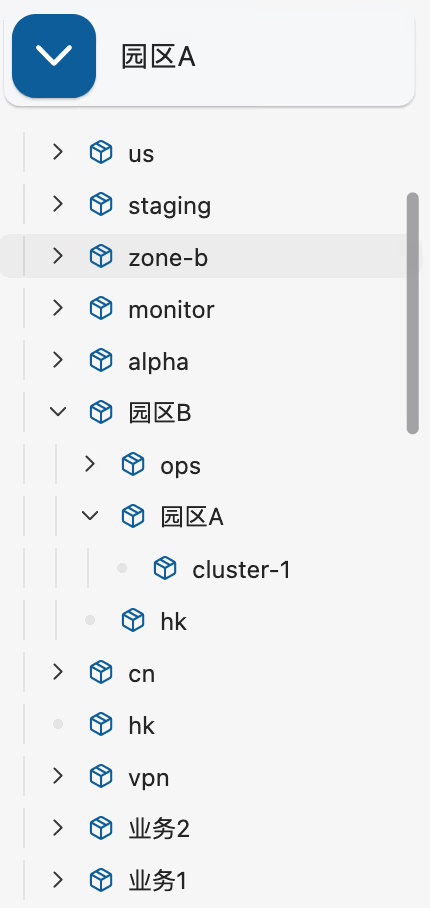
The value of this approach is that it does not simply “list” servers. It places them into a hierarchical system that is easier to understand and maintain.
When the grouping is clear enough, you will notice several obvious benefits in daily use:
- No matter how many servers there are, they do not turn into one long, hard-to-understand list
- In team collaboration, everyone can manage resources according to a unified structure more easily
- When you need to scale later, you can simply keep adding nodes within the existing structure
- Clear logical layers can effectively reduce the risk of mistakes
In theory, multi-level grouping can expand indefinitely, which makes it especially suitable for scenarios that grow from dozens of servers to thousands or more.
2. Use Names, IPs, and Fuzzy Search to Reduce the Time Needed to Find a Target Server
Once you have many servers, the second most common problem is simple: you cannot find them.Many times, you only know part of a machine’s name, or only remember part of its IP address, or just know it belongs to a certain business. If the tool does not support efficient search, the process of locating it becomes very inefficient.
That is why a server management tool must have fast search capabilities. And it should not be limited to exact matches. It should support fuzzy search by name, IP, and keywords.
Search Capability Determines the Upper Limit of Operational Efficiency

When you need to jump quickly among a large number of servers, search is often more efficient than manually expanding hierarchical groups. Especially in the following scenarios, search is almost essential:
- Handling a temporary incident and needing to enter a target machine immediately
- Managing many similar machines and needing to locate a specific instance quickly
- Only remembering part of an IP address or part of a naming keyword
- Needing to switch quickly across different projects or groups
A search entry that feels natural to use can shorten the path from “knowing the target” to “opening the connection” as much as possible. In high-frequency operations scenarios, this kind of efficiency improvement is direct and highly valuable.
3. Add Another Management Dimension with Color Labels
Directory grouping alone cannot cover every management need.
In many cases, a server’s “ownership” is only one dimension, while operations teams need another way to understand those machines. For example:
- Which machines are high priority
- Which ones are core business nodes
- Which ones need special attention
- Which ones are in a special maintenance phase
- Which machines play similar roles
This is where color labels become useful. They do not replace grouping. Instead, they provide a more flexible and intuitive auxiliary identification system alongside grouping.
Color Labels Make Server Lists Easier to Understand at a Glance
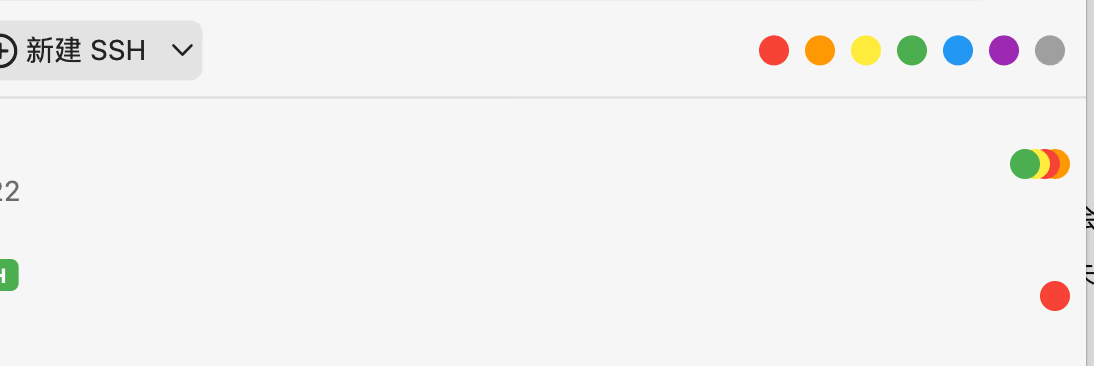
The value of color labels is that they make information recognition faster. Compared with opening details and judging items one by one, color labels help you complete an initial round of filtering and identification directly at the list level.
This approach is especially suitable for the following situations:
- Quickly identifying critical machines in production
- Distinguishing servers by risk level or responsibility type
- Organizing existing server assets from another dimension
- Working with a long list while still being able to spot important targets at a glance
In large-scale server management, many efficiency gains do not come from complex features, but from small designs that are intuitive enough. Color labels are one very practical example.
4. Filter by Protocol So Different Types of Connections Stay in Their Proper Place
In real-world work, server management usually involves more than one protocol.In addition to common SSH connections, many teams also use RDP, VNC, and Telnet, sometimes together with file transfer capabilities, to complete daily remote operations. If all connections are mixed together, the management experience quickly declines.
That is why protocol-based filtering is a very important capability in large-scale remote management.
Protocol Filtering Reduces List Noise
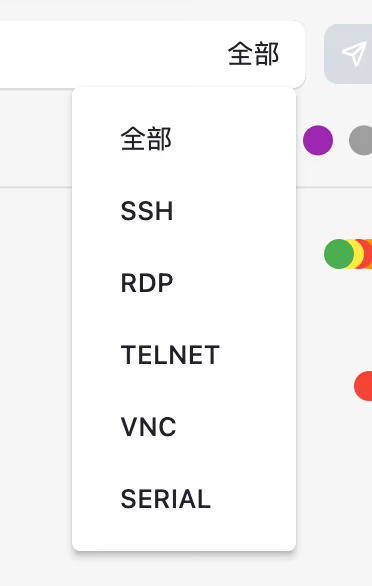
With protocol filtering, you can work within the scope required by the current task instead of being distracted by every connection record.
The direct benefits include:
- When handling SSH tasks, you only see SSH servers
- When performing remote desktop work, you can quickly switch to RDP or VNC resources
- Different resource types can be viewed separately, reducing visual noise
- In a team environment with mixed protocols, management becomes much clearer
When the number of servers is large enough, reducing interference is itself an efficiency optimization. At its core, protocol-based filtering helps turn a complex list into a task-relevant working view.
5. Smooth Performance Still Matters Even with Large Numbers of Servers
Many tools may look similar in terms of features, but once the server scale grows, the differences become obvious.If a server management tool starts lagging with long lists, has delayed scrolling, expands groups awkwardly, or responds slowly to search, then even a rich feature set will be offset by poor day-to-day usability.
That is why in large-scale management scenarios, performance is not an extra. It is a basic capability.DartShell addresses this with dynamic caching and on-demand loading mechanisms. The point is simple: even as the server list keeps growing, the tool still aims to remain lightweight and smooth in use, without letting “too many servers” become a new burden.
6. Manage Authentication Information Centrally to Reduce Repetitive Maintenance Costs
The more servers you have, the easier it is to underestimate the cost of maintaining authentication information.In many real scenarios, multiple server groups may share the same username and password, or use the same key or certificate. If every new server requires the same information to be entered again, it not only wastes time, but also makes it easy to miss updates later.
That is why separating authentication information from connection records to a reasonable extent and managing it centrally is a critical step in large-scale server management.
Centralized Authentication Management Can Significantly Reduce Maintenance Burden
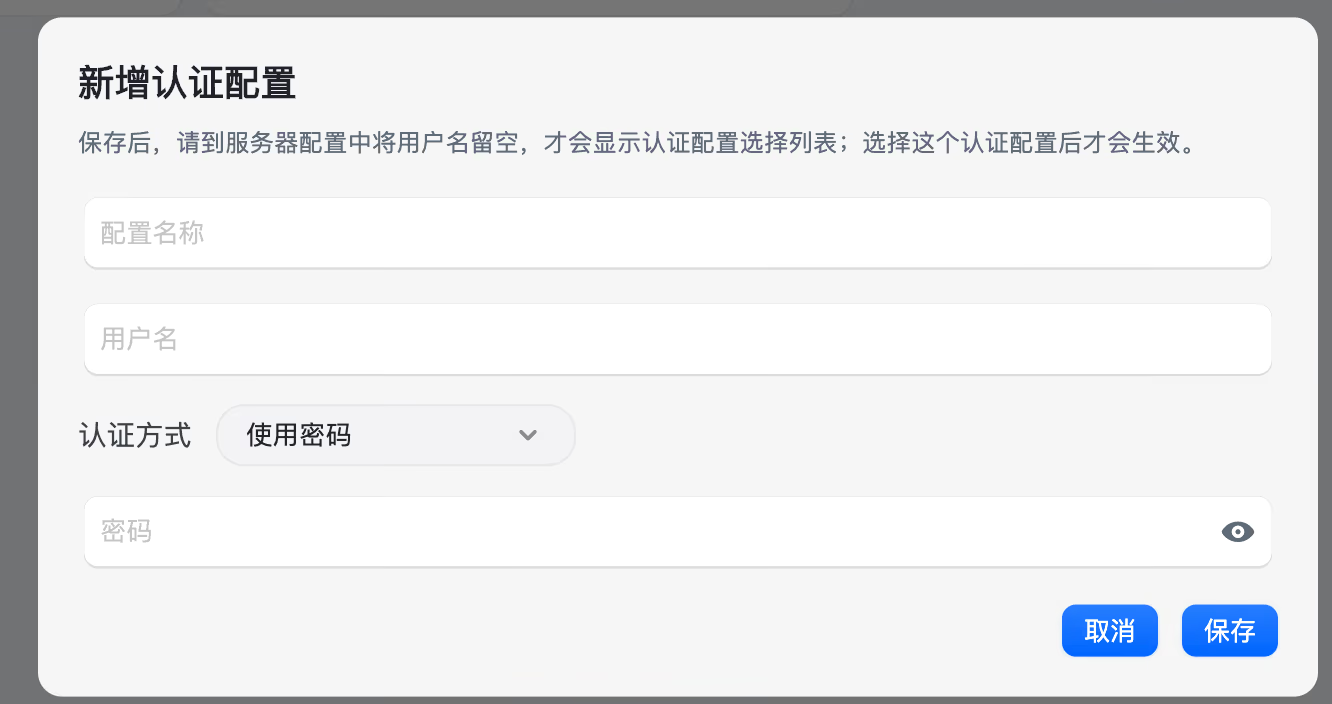
This design brings several very obvious benefits in daily use:
- The same username, password, or certificate only needs to be maintained once
- When a batch of servers shares the same authentication method, you do not need to fill it in repeatedly
- When a password or certificate needs to be updated, you only need to change it in one place
- It can reduce the chance of errors when manually maintaining a large number of connection configurations
This may look like a “detail feature,” but once the server scale grows, it directly affects long-term usage costs. In many cases, what truly makes a tool efficient is not a flashy feature, but its ability to continuously save time and reduce repetitive work.
In Large-Scale Server Management, the Core Is Not Feature Bloat, but Hiding Complexity
Looking back, the real difficulty in managing thousands of servers is not establishing connections, but making sure those connections remain orderly, searchable, filterable, and maintainable at all times.From multi-level grouping to fuzzy search, from color labels to protocol filtering, and then to performance optimization and unified authentication management, all of these capabilities are actually solving the same problem: how to turn complexity that would otherwise spiral out of control into a stable, clear, and sustainably maintainable workflow.
This is also where server management tools on Mac begin to truly separate themselves, once they enter a more professional and long-term usage stage, from tools that are merely “good enough to use.”
Conclusion
If the number of servers you manage is no longer in the single digits or just dozens, but is gradually growing into the hundreds or thousands, then continuing to rely on traditional methods will usually only make future maintenance more exhausting.
A more reasonable approach is to establish a structured method for large-scale management as early as possible: give servers hierarchy, searchability, filtering, and labels, while also ensuring that authentication management and performance keep up with the demands of growth.
DartShell was designed with exactly this thinking in mind. What it aims to do is not just gather remote connections into one place, but help you build a server management approach on Mac that is easier, more efficient, and better suited for long-term use.
If you are looking for a server management tool that fits Mac better, you can also take a closer look at DartShell to see whether it matches your remote operations workflow.
DartShell
Want a smoother remote ops workflow on macOS?
DartShell brings SSH, RDP, VNC, SFTP, and serial access together in one native macOS app, so you can reduce tool switching and repetitive setup.
Download DartShell