
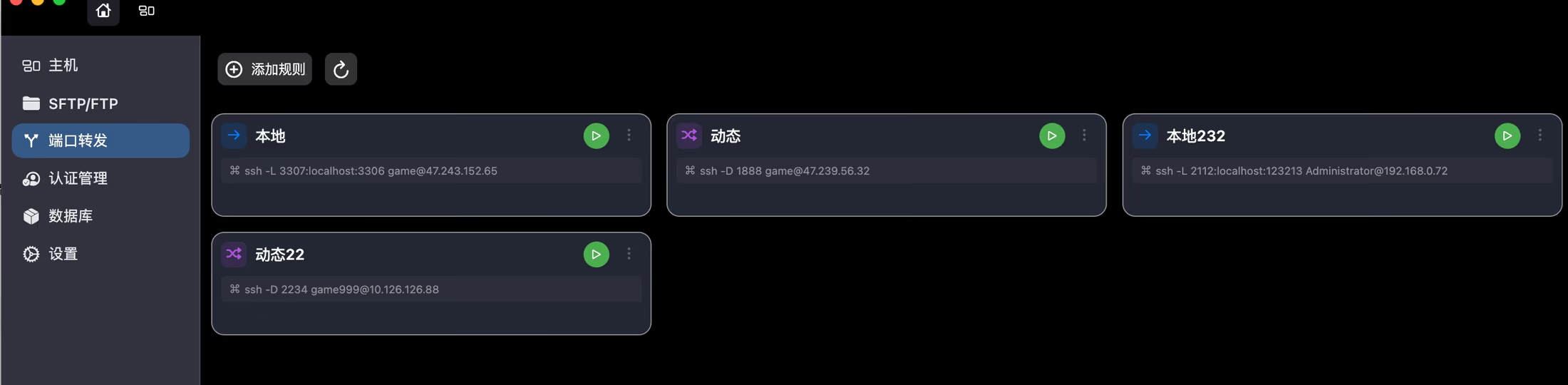
How I use a SOCKS5 proxy to solve server access problems
This article walks through a real jump-host scenario and explains how SSH dynamic port forwarding creates a SOCKS5 proxy for internal servers, Git, databases, and web services.
A lot of developers first encounter SOCKS5 not because they decided to study the protocol, but because they needed to solve a practical access problem.
That was true for me as well. I really understood SOCKS5 in the middle of a server operations task where the target machine was only reachable through a jump host.
A very common real-world setup
In many internal infrastructure environments, the path looks like this: your laptop connects to a jump host, and the jump host is the only system allowed to reach the internal server.
In that setup, running `ssh user@inner-server` directly from your local machine will fail every time. From your laptop's point of view, that internal machine is simply not reachable.
The traditional method works, but only up to a point
The standard approach is to SSH into the jump host first, then SSH again from the jump host into the internal server. That gets the job done for shell access, but the limitations appear quickly.
Once you need more than a terminal, such as a browser, Git, a database client, or an internal web service, that workflow starts to feel restrictive.
- Fine for terminal access, awkward for everything else
- Browser, Git, and database tools cannot naturally reuse the connection
- Every additional service needs extra handling
- The cost rises as the number of services grows
The key step: create a SOCKS5 proxy with SSH
The turning point was realizing that SSH already includes dynamic port forwarding. Running `ssh -D 1080 user@jump-server` creates a local SOCKS5 proxy on your machine.
At that point, the problem changes. Instead of forwarding just one terminal session, you create a path that many local applications can use to reach the internal network through the jump host.
The real value of SOCKS5 is not the protocol in isolation. It is that it turns a jump host from a terminal-only path into a reusable access layer for many local tools.
How SOCKS5 helps in real development work
Once the local proxy is available on `127.0.0.1:1080`, a lot of workflows become easier. Any application that supports SOCKS5 can route its traffic through the jump host and into the internal network.
That means you are no longer limited to shell commands. Browsers, database clients, Git tools, and debugging environments can all work through the same path.
- Open internal admin pages in a browser
- Access internal Git repositories
- Connect database clients to internal databases
- Debug web services that are only exposed inside the network
The hard part is not SOCKS5 itself. It is managing the connections.
When you only have one or two servers, command-line solutions are perfectly reasonable. You can remember a few `ssh -D`, `ssh -L`, and `ssh -J` patterns and keep moving.
The real difficulty appears when the number of servers grows. Different hosts need different jump hosts, proxy ports, and forwarding rules. The cost shifts from protocol knowledge to remembering and organizing all of that connection state.
- Which machine needs dynamic SOCKS5 forwarding
- Which machine needs local port forwarding instead
- Which local port belongs to which jump host
- Which services also involve VNC or SFTP on top
Why so many people eventually move toward GUI tools
As server count and protocol count increase, the command line stays powerful, but it also becomes increasingly dependent on memory, notes, and manual bookkeeping. People end up storing commands in note apps, host information in spreadsheets, and protocols across different tools.
That is where GUI remote management tools become useful. They do not replace the underlying protocols. They reduce the repeated effort of reconstructing the same access information every time.
Why integrated remote tooling works better over time
If you only SSH into a machine occasionally, the command line is still excellent. But if your daily work involves multiple servers, jump hosts, proxies, and protocols, centralized management becomes much more efficient.
A tool like DartShell is useful because host information is stored once, and then SSH, RDP, VNC, SFTP, and related access paths are organized around the same machine record instead of scattered across separate tools.
- Store host IPs, usernames, ports, and protocol data together
- Reduce repeated input and repeated setup
- Fit multi-protocol operations work better
- Remain manageable as infrastructure grows
Bottom line
SOCKS5 is valuable in operations work because it turns many otherwise inaccessible internal services into resources that local tools can actually use.
If you regularly work with internal servers, remote debugging, or jump-host-heavy infrastructure, understanding SOCKS5 and SSH dynamic forwarding will make your workflow much smoother. And once that access complexity grows, putting those connections inside one remote management workflow usually saves even more time.
DartShell
Want proxies, jump hosts, and remote connections in one workflow?
Use DartShell to organize SSH, RDP, VNC, SFTP, and related remote access details in one place.
Download DartShell